Internal Device Temperature Synchronization
Principle
This function allows synchronizing the internal temperature of underlying devices in two different ways for a over_climate type VTherm. Basically, it allows using a remote thermometer if your device supports it. It is particularly useful for thermostatic radiator valves (TRV) that have their own integrated temperature sensor. It will greatly improve the internal regulation of underlying over_climate type devices that support it.
The two available synchronization modes are:
- Mode 1 - Use calibration offset: VTherm uses the device's internal calibration offset entity to compensate for the difference with the room temperature,
- Mode 2 - Synchronize temperature directly with the device: VTherm sends the room temperature directly to the device so that it uses it in its own regulation.
The choice will depend on what your underlying device can do. For example:
- the Sonoff TRVZB can do both. You will use either the calibration offset via the exposed entity with a compass, or the named external temperature (
external_temperature_input). Be careful to set thesensor_selectoption toexternalin this case, - the Aqara W600 only has the calibration entity (the icon is a compass by default)
Prerequisites
This function requires:
- a
over_climatetype VTherm, - for mode 1: a device that supports the
local_temperature_calibrationentity or equivalent allowing to calibrate its internal temperature, - for mode 2: a device that supports the
external_temperature_inputentity or equivalent.
Notes
- This function is not available for
over_switchorover_valvetype VTherms which do not have an underlying climate device.- Check your devices' compatibility to choose the right mode.
Configuration
The configuration of this function is done in two steps.
In the underlying configuration, you indicate that your devices are equipped with one of the 2 internal temperature synchronization functions by checking the appropriate option:

This adds a menu called Synchronisation de la température de l'appareil that must be configured:
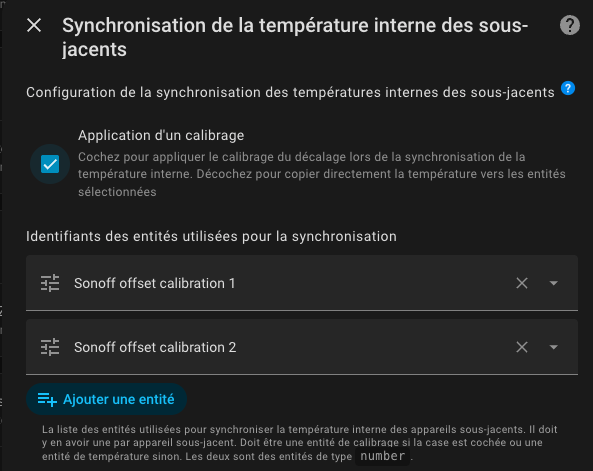
You must check the Application d'un calibrage option to choose option 1. Otherwise option 2 will be applied.
Then you provide the list of entities to control:
- either the list of
local_temperature_calibrationentities if you are in case 1, - or the list of
external_temperature_inputentities if you are in case 2.
The entities must be in the order of declaration of the underlying devices and there must be the same number.
- The two modes are mutually exclusive. You can only activate one at a time.
- It is not possible to mix two synchronization methods within the same VTherm. You must use 2 VTherms if you need to.
- In the case of method 2, your device may need additional configuration. Since this configuration is device-dependent, it is not handled by VTherm. For example, on the Sonoff TRVZB, the
select.xxx_sensor_selectoption must be set toexternal.
Synchronization Mode
Mode 1: Using a Calibration Entity
In this method, you must provide the number entity that allows calibrating the temperature offset of your device. This entity is generally named local_temperature_calibration or temperature_calibration_offset.
VTherm:
- retrieves the device's internal temperature,
- calculates the necessary offset:
offset = room_temperature - internal_temperature, - sends this offset to the provided calibration entity via the
number.set_valueservice.
Example:
- Room temperature (external sensor): 19°C
- TRV internal temperature: 21°C
- Calculated offset: 19°C - 21°C = -2°C
- The -2°C offset is added to the current offset and is sent to the
number.salon_trv_local_temperature_calibrationentity
Advantages:
- The device regulates with the actual room temperature,
- Avoids oscillations due to compensation,
- Works with all devices exposing a calibration
numberentity, - The calibration is sent each time a new temperature is received from the room sensor independently of the VTherm calculation cycle.
Mode 2: Direct Copy of External Temperature
In this method, VTherm directly sends the room temperature to the device using the external_temperature_input entity or equivalent.
VTherm:
- retrieves the room temperature from its external sensor,
- calls
number.set_valuewith the room temperature as value
Example:
- VTherm target temperature: 20°C
- Room temperature: 19°C
- VTherm sends:
number.set_value(19)on theexternal_temperature_inputentity - The device directly receives the room temperature
Advantages:
- Simplest method,
- Works with certain devices that accept the
external_temperature_inputparameter, - The device can directly use this temperature for its regulation,
- The temperature is sent each time a new temperature is received from the room sensor independently of the VTherm calculation cycle.
Disadvantages:
- Few devices support this method: few devices have this option,
- Mainly works with certain specific Zigbee devices (e.g., Sonoff TRVZB),
- The use of this temperature is often related to another configuration.