Some Essential Add-Ons
- Some Essential Add-Ons
- the Versatile Thermostat UI Card
- the Scheduler Component!
- Regulation curves with Plotly to Fine-Tune Your Thermostat
- Rgulation curves with Apex-charts (thanks to @gael1980)
- Event notification with the AppDaemon NOTIFIER
- Indoor "Feels Like" Temperature and the "Damp Cold" Effect (thanks to @nicola-spreafico)
- A complementary integration to anticipate setpoint changes (thanks to @RastaChaum)
the Versatile Thermostat UI Card
A dedicated card for the Versatile Thermostat has been developed (based on Better Thermostat). It is available here: Versatile Thermostat UI Card and offers a modern view of all the VTherm statuses:

the Scheduler Component!
To make the most out of the Versatile Thermostat, I recommend using it with the Scheduler Component. The scheduler component provides climate scheduling based on predefined modes. While this feature is somewhat limited with the generic thermostat, it becomes very powerful when paired with the Versatile Thermostat.
Assuming you have installed both the Versatile Thermostat and the Scheduler Component, here’s an example:
In Scheduler, add a schedule:

Choose the "Climate" group, select one (or more) entity, pick "MAKE SCHEME," and click next: (You can also choose "SET PRESET," but I prefer "MAKE SCHEME.")
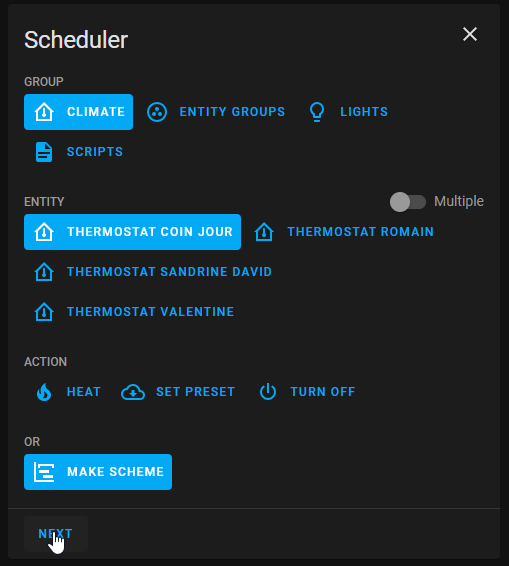
Define your mode scheme and save:

In this example, I set ECO mode during the night and when no one is home during the day, BOOST in the morning, and COMFORT in the evening.
I hope this example helps; feel free to share your feedback!
Regulation curves with Plotly to Fine-Tune Your Thermostat
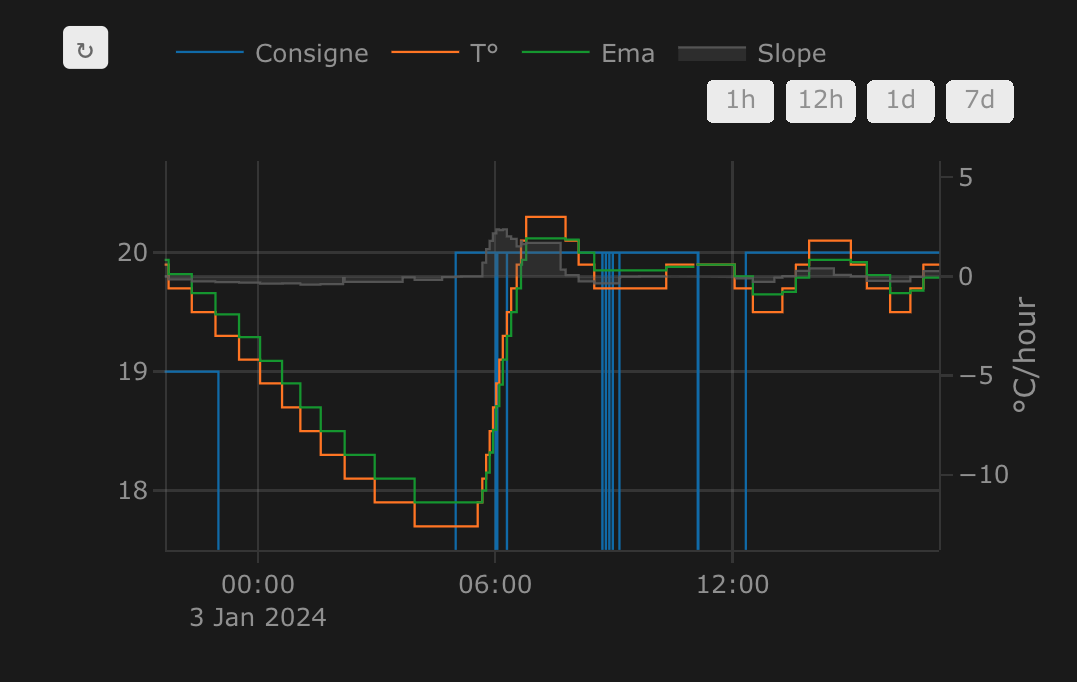
You can obtain a curve similar to the one shown in some results using a Plotly graph configuration by leveraging the thermostat's custom attributes described here:
Replace the values between [[ ]] with your own.
- type: custom:plotly-graph
  entities:
    - entity: '[[climate]]'
      attribute: temperature
      yaxis: y1
      name: Wanted
    - entity: '[[climate]]'
      attribute: current_temperature
      yaxis: y1
      name: T°
    - entity: '[[ema_temperature]]'
      yaxis: y1
      name: Ema
    - entity: '[[power_percent]]'
      yaxis: y2
      name: Power percent
      fill: tozeroy
      fillcolor: rgba(200, 10, 10, 0.3)
      line:
        color: rgba(200, 10, 10, 0.9)
    - entity: '[[slope]]'
      name: Slope
      fill: tozeroy
      yaxis: y9
      fillcolor: rgba(100, 100, 100, 0.3)
      line:
        color: rgba(100, 100, 100, 0.9)
  hours_to_show: 4
  refresh_interval: 10
  height: 800
  config:
    scrollZoom: true
  layout:
    margin:
      r: 50
    legend:
      x: 0
      'y': 1.2
      groupclick: togglegroup
      title:
        side: top right
    yaxis:
      visible: true
      position: 0
    yaxis2:
      visible: true
      position: 0
      fixedrange: true
      range:
        - 0
        - 1
    yaxis9:
      visible: true
      fixedrange: false
      range:
        - -2
        - 2
      position: 1
    xaxis:
      rangeselector:
        'y': 1.1
        x: 0.7
        buttons:
          - count: 1
            step: hour
          - count: 12
            step: hour
          - count: 1
            step: day
          - count: 7
            step: day
Example of curves obtained with Plotly:
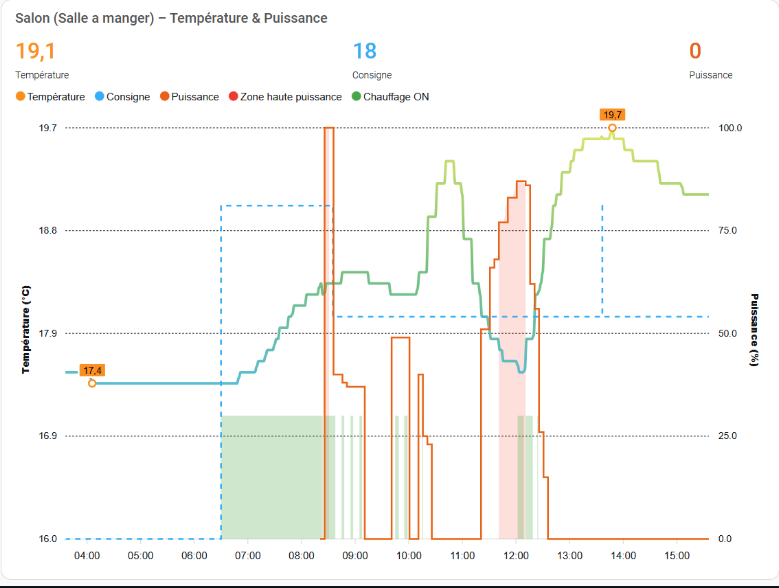
Regulation curves with Apex-charts (thanks to @gael1980)
Apex chart allows to display some great reguation curves. @Gael1980 gives us a very good example here.
Event notification with the AppDaemon NOTIFIER
This automation leverages the excellent AppDaemon app named NOTIFIER, developed by Horizon Domotique, demonstrated here, and the code is available here. It allows users to be notified of security-related events occurring on any Versatile Thermostat.
This is a great example of using the notifications described here: events.
<details>alias: Heating Security Monitoring
description: Sends a notification when a thermostat enters safety or power mode
trigger:
- platform: event
event_type: versatile_thermostat_safety_event
id: versatile_thermostat_safety_event
- platform: event
event_type: versatile_thermostat_power_event
id: versatile_thermostat_power_event
- platform: event
event_type: versatile_thermostat_temperature_event
id: versatile_thermostat_temperature_event
condition: []
action:
- choose:
- conditions:
- condition: trigger
id: versatile_thermostat_safety_event
sequence:
- event: NOTIFIER
event_data:
action: send_to_jmc
title: >-
Radiator {{ trigger.event.data.name }} - {{
trigger.event.data.type }} Safety
message: >-
Radiator {{ trigger.event.data.name }} switched to {{
trigger.event.data.type }} safety because the thermometer no
longer responds.\n{{ trigger.event.data }}
callback:
- title: Stop heating
event: stopper_chauffage
image_url: /media/local/alerte-securite.jpg
click_url: /lovelace-chauffage/4
icon: mdi:radiator-off
tag: radiateur_security_alerte
persistent: true
- conditions:
- condition: trigger
id: versatile_thermostat_power_event
sequence:
- event: NOTIFIER
event_data:
action: send_to_jmc
title: >-
Radiator {{ trigger.event.data.name }} - {{
trigger.event.data.type }} Load shedding
message: >-
Radiator {{ trigger.event.data.name }} switched to {{
trigger.event.data.type }} load shedding because the maximum
power was exceeded.\n{{ trigger.event.data }}
callback:
- title: Stop heating
event: stopper_chauffage
image_url: /media/local/alerte-delestage.jpg
click_url: /lovelace-chauffage/4
icon: mdi:radiator-off
tag: radiateur_power_alerte
persistent: true
- conditions:
- condition: trigger
id: versatile_thermostat_temperature_event
sequence:
- event: NOTIFIER
event_data:
action: send_to_jmc
title: >-
Radiator {{ trigger.event.data.name }} thermometer is not
responding
message: >-
Radiator {{ trigger.event.data.name }} thermometer has not
responded for a long time.\n{{ trigger.event.data }}
image_url: /media/local/thermometre-alerte.jpg
click_url: /lovelace-chauffage/4
icon: mdi:radiator-disabled
tag: radiateur_thermometre_alerte
persistent: true
mode: queued
max: 30
Indoor "Feels Like" Temperature and the "Damp Cold" Effect (thanks to @nicola-spreafico)
An brillant post to add a feature name "Feels like" or "Damp Cold". You can force the target temperature to a higher value depending on weather conditions like humidity or wind. The post is here
A complementary integration to anticipate setpoint changes (thanks to @RastaChaum)
This integration (in beta as of 11/23/2025) proposes to anticipate the setpoint changes of your Scheduler so that the target temperature is reached at the time of the Scheduler change. It learns the behavior of your VTherm (temperature rise time, speed and temperature rise time) and applies a predictive algorithm to anticipate the Scheduler change. The approach is very interesting and offers a good complement to VTherm.
It is available here