Choosing Basic Attributes
Select the "Main Attributes" menu.
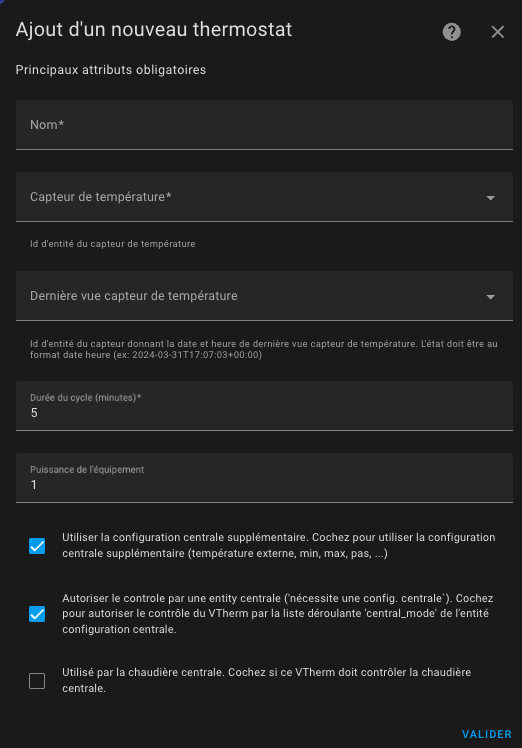
| Attribute | Description | Attribute Name |
|---|---|---|
| Name | Name of the entity (this will be the name of the integration and the climate entity). | |
| Temperature Sensor | Entity ID of the sensor providing the room temperature where the device is installed. | |
| Last Updated Sensor (optional) | Prevents safety shutdowns when temperature is stable and sensor stops reporting. (see troubleshooting) | |
| Cycle Duration | Duration in minutes between each calculation. For over_switch: modulates on/off time. For over_valve: calculates valve opening. For over_climate: performs controls and recalculates self-regulation coefficients. With the over_switch and over_valve types, calculations are performed at each cycle. In case of changing conditions, you will need to wait for the next cycle to see a change. For this reason, the cycle should not be too long. 5 minutes is a good value, but it should be adjusted to your heating type. The greater the inertia, the longer the cycle should be. See Tuning examples. If the cycle is too short, the radiator may never reach the target temperature. For example, with a storage heater, it will be unnecessarily activated. | cycle_min |
| Equipment Power | Activates power/energy sensors. Specify total if multiple devices (same unit as other VTherms and sensors). (see: Power shedding feature) | device_power |
| Centralized Additional Parameters | Uses outdoor temperature, min/max/step temperature from centralized config. | |
| Centralized Control | Enables centralized thermostat control. See centralized control | is_controlled_by_central_mode |
| Central Boiler Trigger | Checkbox to use this VTherm as a central boiler trigger. | is_used_by_central_boiler |
Choosing the features to Use
Select the "Features" menu.
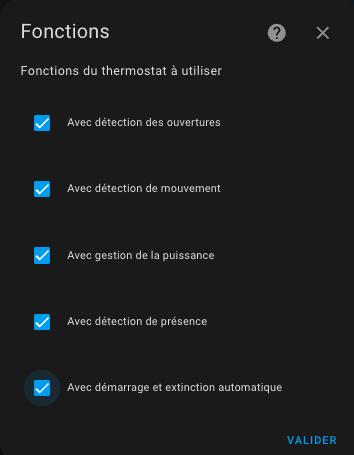
| Feature | Description | Attribute Name |
|---|---|---|
| With opening detection | Stops heating when doors/windows open. (see managing openings) | is_window_configured |
| With motion detection | Adjusts target temperature on room motion detection. (see motion detection) | is_motion_configured |
| With power management | Stops device if home power consumption exceeds threshold. (see load-shedding management) | is_power_configured |
| With presence detection | Changes target temperature based on presence/absence. Differs from motion detection (home vs room level). (see presence management) | is_presence_configured |
| With automatic start/stop | For over_climate only: stops/restarts device based on temperature curve prediction. (see automatic start/stop management) | is_window_auto_configured |
Notes
- The list of available functions adapts to your VTherm type.
- When you enable a function, a new menu entry is added to configure it.
- You cannot validate the creation of a VTherm if all parameters for all enabled functions have not been configured.