Heating Failure Detection
- Heating Failure Detection
Why this feature?
Heating failure detection allows you to monitor the proper operation of your heating system. It detects two types of abnormal situations:
-
Heating failure: the thermostat is requesting a lot of power (high
on_percent) but the temperature is not increasing. This may indicate:- a faulty or turned off radiator,
- a stuck thermostatic valve,
- an undetected open window,
- a hot water circulation problem (central heating).
-
Cooling failure: the thermostat is not requesting power (
on_percentat 0) but the temperature keeps rising. This may indicate:- a radiator that stays on despite the stop command,
- a relay stuck in the "on" position,
- an underlying device that is no longer responding.
Important
This feature does not change the thermostat's behavior. It only sends events to alert you of an abnormal situation. It is up to you to create the necessary automations to react to these events (notifications, alerts, etc.).
How it works
This feature only applies to VTherm using the TPI algorithm (over_switch, over_valve, or over_climate with valve regulation). Therefore, over_climate VTherms that control a heat pump, for example, are not affected. Indeed, in this case, the heating decision is made by the underlying device itself, which prevents access to reliable information.
This function only applies to Heating mode (hvac_mode=heat). In cooling mode (hvac_mode=cool) no detection is performed to avoid false positives.
Heating failure detection
- The VTherm is in heating mode,
- The
on_percentis greater than or equal to the configured threshold (default 90%), - This situation has lasted longer than the detection delay (default 15 minutes),
- The temperature has not increased during this period.
➡️ A versatile_thermostat_heating_failure_event event is emitted with failure_type: heating and type: heating_failure_start.
When the situation returns to normal (temperature rising or on_percent dropping), an event with type: heating_failure_end is emitted.
Cooling failure detection
- The VTherm is in heating mode,
- The
on_percentis less than or equal to the configured threshold (default 0%), - This situation has lasted longer than the detection delay (default 15 minutes),
- The temperature continues to rise.
➡️ A versatile_thermostat_heating_failure_event event is emitted with failure_type: cooling and type: cooling_failure_start.
When the situation returns to normal, an event with type: cooling_failure_end is emitted.
Configuration
Like many VTherm features, this functionality can be configured in the central configuration to share parameters. To apply it to the chosen VTherms, the user must add the feature (see "Features" menu) and choose to use the common parameters from the central configuration or specify new ones that will only be applied to this VTherm.
To access it:
- Go to the configuration of your "Central Configuration" type VTherm
- In the menu, select "Heating failure detection"
- Then go to the configuration of the relevant VTherms,
- Select the "Features" menu,
- Check the "Heating failure detection" feature,
- Choose to use the central configuration parameters or specify new ones.
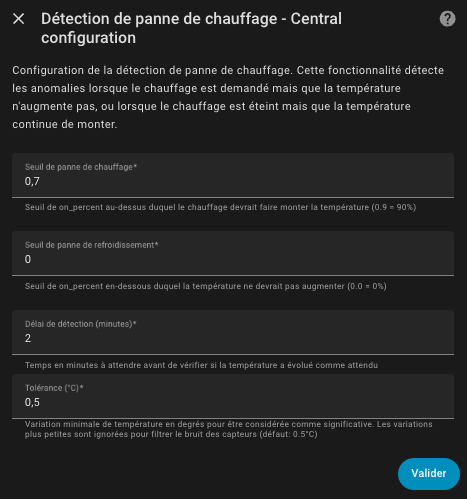
Parameters
| Parameter | Description | Default value |
|---|---|---|
| Enable heating failure detection | Enables or disables the feature | Disabled |
| Heating failure threshold | on_percent percentage above which heating should cause temperature to increase. Value between 0 and 1 (0.9 = 90%) | 0.9 (90%) |
| Cooling failure threshold | on_percent percentage below which temperature should not increase. Value between 0 and 1 (0 = 0%) | 0.0 (0%) |
| Detection delay (minutes) | Waiting time before declaring a failure. Helps avoid false positives due to normal fluctuations | 15 minutes |
| Temperature change tolerance (°C) | Minimum temperature change in degrees to consider significant. Smaller changes are ignored to filter sensor noise | 0.5°C |
- Heating threshold: If you have false positives (failure detection when everything is working), increase this threshold to 0.95 or 1.0.
- Cooling threshold: If you want to detect a radiator that stays on even with a low
on_percent, increase this threshold to 0.05 or 0.1.- Detection delay: Increase this delay if you have rooms with high thermal inertia (large rooms, underfloor heating, etc.). You can look at the heating curves (see additions) and see how long it takes for your thermometer to increase after heating is triggered. This duration should be the minimum for this parameter.
- Tolerance: If you have inaccurate or noisy sensors, increase this value (e.g., 0.8°C). Many sensors have an accuracy of ±0.5°C.
Exposed attributes
VTherms with TPI expose the following attributes:
is_heating_failure_detection_configured: true
heating_failure_detection_manager:
  heating_failure_state: "off"      # "on", "off", "unknown", "unavailable"
  cooling_failure_state: "off"      # "on", "off", "unknown", "unavailable"
  heating_failure_threshold: 0.9
  cooling_failure_threshold: 0.0
  detection_delay_min: 15
  temperature_change_tolerance: 0.5
  heating_tracking:                 # Heating failure detection tracking
    is_tracking: true               # Detection in progress?
    initial_temperature: 19.5       # Temperature at the start of tracking
    current_temperature: 19.7       # Current temperature
    remaining_time_min: 8.5         # Minutes remaining before alert
    elapsed_time_min: 6.5           # Minutes elapsed since start
  cooling_tracking:                 # Cooling failure detection tracking
    is_tracking: false
    initial_temperature: null
    current_temperature: null
    remaining_time_min: null
    elapsed_time_min: null
Binary sensor
When heating failure detection is enabled, a binary sensor is automatically created for each relevant VTherm:
| Entity | Description |
|---|---|
binary_sensor.<name>_heating_failure_state | Indicates if a heating or cooling failure is detected |
The sensor's display name is translated according to your Home Assistant language "Heating failure state".
This sensor is:
- ON when an anomaly (heating or cooling) is detected
- OFF when the system is working normally
Characteristics:
- Device class:
problem(enables native Home Assistant alerts) - Icons:
mdi:radiator-offwhen an anomaly is detectedmdi:radiatorwhen everything is working
This binary sensor can be used directly in your automations as a trigger, or to create alerts via Home Assistant's native notifications.
Events
The versatile_thermostat_heating_failure_event event is emitted when a failure is detected or ends.
Event data:
| Field | Description |
|---|---|
entity_id | The VTherm identifier |
name | The VTherm name |
type | Event type: heating_failure_start, heating_failure_end, cooling_failure_start, cooling_failure_end |
failure_type | Failure type: heating or cooling |
on_percent | The power percentage requested at the time of detection |
temperature_difference | The temperature difference observed during the detection period |
current_temp | The current temperature |
target_temp | The target temperature |
threshold | The configured threshold that triggered the detection |
detection_delay_min | The configured detection delay |
state_attributes | All entity attributes at the time of the event |
Automation examples
Persistent notification for heating failure
This automation creates a persistent notification when a heating failure is detected:
  alias: "Heating failure alert"
  description: "Creates a persistent notification when heating failure is detected"
  trigger:
    - platform: event
      event_type: versatile_thermostat_heating_failure_event
  condition:
    - condition: template
      value_template: "{{ trigger.event.data.type == 'heating_failure_start' }}"
  action:
    - service: persistent_notification.create
      data:
        title: "🔥 Heating failure detected"
        message: >
          The thermostat **{{ trigger.event.data.name }}** has detected a heating failure.

          📊 **Details:**
          - Power requested: {{ (trigger.event.data.on_percent * 100) | round(0) }}%
          - Current temperature: {{ trigger.event.data.current_temp }}°C
          - Target temperature: {{ trigger.event.data.target_temp }}°C
          - Temperature change: {{ trigger.event.data.temperature_difference | round(2) }}°C

          ⚠️ The heating is running at full power but the temperature is not increasing.
          Check that the radiator is working properly.
        notification_id: "heating_failure_{{ trigger.event.data.entity_id }}"
Persistent notification for all failure types
This automation handles both failure types (heating and cooling):
  alias: "Heating anomaly alert"
  description: "Notification for all types of heating failures"
  trigger:
    - platform: event
      event_type: versatile_thermostat_heating_failure_event
  condition:
    - condition: template
      value_template: "{{ trigger.event.data.type in ['heating_failure_start', 'cooling_failure_start'] }}"
  action:
    - service: persistent_notification.create
      data:
        title: >
          {% if trigger.event.data.failure_type == 'heating' %}
            🔥 Heating failure detected
          {% else %}
            ❄️ Cooling failure detected
          {% endif %}
        message: >
          The thermostat **{{ trigger.event.data.name }}** has detected an anomaly.

          📊 **Details:**
          - Failure type: {{ trigger.event.data.failure_type }}
          - Power requested: {{ (trigger.event.data.on_percent * 100) | round(0) }}%
          - Current temperature: {{ trigger.event.data.current_temp }}°C
          - Target temperature: {{ trigger.event.data.target_temp }}°C
          - Temperature change: {{ trigger.event.data.temperature_difference | round(2) }}°C

          {% if trigger.event.data.failure_type == 'heating' %}
          ⚠️ The heating is running at {{ (trigger.event.data.on_percent * 100) | round(0) }}% but the temperature is not increasing.
          Check that the radiator is working properly.
          {% else %}
          ⚠️ The heating is off but the temperature keeps rising.
          Check that the radiator turns off properly.
          {% endif %}
        notification_id: "heating_failure_{{ trigger.event.data.entity_id }}"
Automatically dismiss notification when failure is resolved
This automation dismisses the persistent notification when the failure is resolved:
  alias: "Heating anomaly resolved"
  description: "Dismisses the notification when the failure is resolved"
  trigger:
    - platform: event
      event_type: versatile_thermostat_heating_failure_event
  condition:
    - condition: template
      value_template: "{{ trigger.event.data.type in ['heating_failure_end', 'cooling_failure_end'] }}"
  action:
    - service: persistent_notification.dismiss
      data:
        notification_id: "heating_failure_{{ trigger.event.data.entity_id }}"
    - service: persistent_notification.create
      data:
        title: "✅ Anomaly resolved"
        message: >
          The thermostat **{{ trigger.event.data.name }}** is working normally again.
        notification_id: "heating_failure_resolved_{{ trigger.event.data.entity_id }}"
    # Automatically dismiss the resolution notification after 1 hour
    - delay:
        hours: 1
    - service: persistent_notification.dismiss
      data:
        notification_id: "heating_failure_resolved_{{ trigger.event.data.entity_id }}"
- Persistent notifications remain displayed until the user closes them or they are dismissed by an automation.
- Using
notification_idallows you to update or dismiss a specific notification.- You can adapt these automations to send notifications on mobile, Telegram, or any other notification service.
- This feature only works with VTherms using the TPI algorithm (over_switch, over_valve, or over_climate with valve regulation).