Reference Documentation
Parameter Summary
| Parameter | Label | "over switch" | "over climate" | "over valve" | "central configuration" |
|---|---|---|---|---|---|
name | Name | X | X | X | - |
thermostat_type | Thermostat type | X | X | X | - |
temperature_sensor_entity_id | Temperature sensor entity id | X | X (auto-regulation) | X | - |
external_temperature_sensor_entity_id | External temperature sensor entity id | X | X (auto-regulation) | X | X |
cycle_min | Cycle duration (minutes) | X | X | X | - |
temp_min | Minimum allowed temperature | X | X | X | X |
temp_max | Maximum allowed temperature | X | X | X | X |
device_power | Device power | X | X | X | - |
use_central_mode | Enable centralized control | X | X | X | - |
use_window_feature | With window detection | X | X | X | - |
use_motion_feature | With motion detection | X | X | X | - |
use_power_feature | With power management | X | X | X | - |
use_presence_feature | With presence detection | X | X | X | - |
heater_entity1_id | 1st heater | X | - | - | - |
heater_entity2_id | 2nd heater | X | - | - | - |
heater_entity3_id | 3rd heater | X | - | - | - |
heater_entity4_id | 4th heater | X | - | - | - |
heater_keep_alive | Switch refresh interval | X | - | - | - |
proportional_function | Algorithm | X | - | - | - |
climate_entity1_id | Underlying thermostat | - | X | - | - |
climate_entity2_id | 2nd underlying thermostat | - | X | - | - |
climate_entity3_id | 3rd underlying thermostat | - | X | - | - |
climate_entity4_id | 4th underlying thermostat | - | X | - | - |
valve_entity1_id | Underlying valve | - | - | X | - |
valve_entity2_id | 2nd underlying valve | - | - | X | - |
valve_entity3_id | 3rd underlying valve | - | - | X | - |
valve_entity4_id | 4th underlying valve | - | - | X | - |
ac_mode | Use of air conditioning (AC)? | X | X | X | - |
tpi_coef_int | Coefficient for internal temperature delta | X | - | X | X |
tpi_coef_ext | Coefficient for external temperature delta | X | - | X | X |
frost_temp | Frost preset temperature | X | X | X | X |
window_sensor_entity_id | Window sensor (entity id) | X | X | X | - |
window_delay | Delay before turn-off (seconds) | X | X | X | X |
window_auto_open_threshold | High drop threshold for automatic detection (°/min) | X | X | X | X |
window_auto_close_threshold | Low drop threshold for automatic closure detection (°/min) | X | X | X | X |
window_auto_max_duration | Maximum duration of automatic turn-off (minutes) | X | X | X | X |
motion_sensor_entity_id | Motion sensor entity id | X | X | X | - |
motion_delay | Delay before motion is considered (seconds) | X | X | X | - |
motion_off_delay | Delay before end of motion is considered (seconds) | X | X | X | X |
motion_preset | Preset to use if motion is detected | X | X | X | X |
no_motion_preset | Preset to use if no motion is detected | X | X | X | X |
power_sensor_entity_id | Total power sensor (entity id) | X | X | X | X |
max_power_sensor_entity_id | Max power sensor (entity id) | X | X | X | X |
power_temp | Temperature during load shedding | X | X | X | X |
presence_sensor_entity_id | Presence sensor entity id (true if someone is present) | X | X | X | - |
minimal_activation_delay | Minimum activation delay | X | - | - | X |
minimal_deactivation_delay | Minimum deactivation delay | X | - | - | X |
safety_delay_min | Maximum delay between two temperature measurements | X | - | X | X |
safety_min_on_percent | Minimum power percentage to enter security mode | X | - | X | X |
auto_regulation_mode | Auto-regulation mode | - | X | - | - |
auto_regulation_dtemp | Auto-regulation threshold | - | X | - | - |
auto_regulation_period_min | Minimum auto-regulation period | - | X | - | - |
inverse_switch_command | Inverse the switch command (for switches with pilot wire) | X | - | - | - |
auto_fan_mode | Automatic fan mode | - | X | - | - |
auto_regulation_use_device_temp | Use of internal temperature of the underlying device | - | X | - | - |
use_central_boiler_feature | Add central boiler control | - | - | - | X |
central_boiler_activation_service | Boiler activation service | - | - | - | X |
central_boiler_deactivation_service | Boiler deactivation service | - | - | - | X |
central_boiler_activation_delay_sec | Activation delay (seconds) | - | - | - | X |
used_by_controls_central_boiler | Indicates if the VTherm controls the central boiler | X | X | X | - |
use_auto_start_stop_feature | Indicates if the auto start/stop feature is enabled | - | X | - | - |
auto_start_stop_level | The detection level for auto start/stop | - | X | - | - |
Sensors
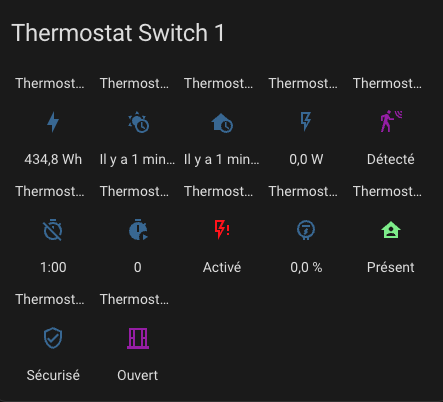
With the thermostat, sensors are available to visualize alerts and the internal state of the thermostat. These are available in the entities of the device associated with the thermostat:

In order, there are:
- the main
climateentity for thermostat control, - the entity allowing the auto-start/stop feature,
- the entity allowing VTherm to follow changes in the underlying device,
- the energy consumed by the thermostat (value that increments continuously),
- the time of receipt of the last external temperature,
- the time of receipt of the last internal temperature,
- the average power of the device during the cycle (for TPI only),
- the time spent in the off state during the cycle (TPI only),
- the time spent in the on state during the cycle (TPI only),
- the load shedding state,
- the power percentage during the cycle (TPI only),
- the presence state (if presence management is configured),
- the security state,
- the window state (if window management is configured),
- the motion state (if motion management is configured),
- the valve opening percentage (for
over_valvetype),
The presence of these entities depends on whether the associated feature is enabled.
To color the sensors, add these lines and customize them as needed in your configuration.yaml:
frontend:
  themes:
    versatile_thermostat_theme:
      state-binary_sensor-safety-on-color: "#FF0B0B"
      state-binary_sensor-power-on-color: "#FF0B0B"
      state-binary_sensor-window-on-color: "rgb(156, 39, 176)"
      state-binary_sensor-motion-on-color: "rgb(156, 39, 176)"
      state-binary_sensor-presence-on-color: "lightgreen"
      state-binary_sensor-running-on-color: "orange"
and choose the theme versatile_thermostat_theme in the panel configuration. You will get something like this:
Actions (Services)
This custom implementation offers specific actions (services) to facilitate integration with other Home Assistant components.
Force Presence/Occupation
This service allows you to force the presence state independently of the presence sensor. This can be useful if you want to manage presence via a service rather than a sensor. For example, you can use your alarm to force absence when it is turned on.
The code to call this service is as follows:
service: versatile_thermostat.set_presence
data:
    presence: "off"
target:
    entity_id: climate.my_thermostat
Modify Security Settings
This service allows you to dynamically modify the security settings described here Advanced Configuration.
If the thermostat is in security mode, the new settings are applied immediately.
To change the security settings, use the following code:
service: versatile_thermostat.set_safety
data:
    min_on_percent: "0.5"
    default_on_percent: "0.1"
    delay_min: 60
target:
    entity_id: climate.my_thermostat
ByPass Window Check
This service allows you to enable or disable a bypass for the window check.
It allows the thermostat to continue heating even if the window is detected as open.
When set to true, changes to the window's status will no longer affect the thermostat. When set to false, the thermostat will be disabled if the window is still open.
To change the bypass setting, use the following code:
service: versatile_thermostat.set_window_bypass
data:
    bypass: true
target:
    entity_id: climate.my_thermostat
Lock / Unlock Services
versatile_thermostat.lock- Locks a thermostat to prevent configuration changesversatile_thermostat.unlock- Unlocks a thermostat to allow configuration changes
See Lock Feature for details.
Change TPI Parameters
All TPI parameters configurable here can be modified by a service. These changes are persistent and survive a restart. They are applied immediately and a thermostat update is performed instantly when parameters are changed.
Each parameter is optional. If it is not provided its current value is kept.
To change the TPI parameters use the following code:
action: versatile_thermostat.set_tpi_parameters
data:
  tpi_coef_int: 0.5
  tpi_coef_ext: 0.01
  minimal_activation_delay: 10
  minimal_deactivation_delay: 10
  tpi_threshold_low: -2
  tpi_threshold_high: 5
target:
  entity_id: climate.sonoff_trvzb
Timed Preset
These services allow you to temporarily force a preset on a thermostat for a specified duration. See Timed Preset for details.
To activate a timed preset:
service: versatile_thermostat.set_timed_preset
data:
  preset: "boost"
  duration_minutes: 30
target:
  entity_id: climate.my_thermostat
To cancel a timed preset before its duration ends:
service: versatile_thermostat.cancel_timed_preset
target:
  entity_id: climate.my_thermostat
Events
The key events of the thermostat are notified via the message bus. The following events are notified:
versatile_thermostat_safety_event: the thermostat enters or exits thesecuritypresetversatile_thermostat_power_event: the thermostat enters or exits thepowerpresetversatile_thermostat_temperature_event: one or both temperature measurements of the thermostat haven't been updated for more than `safety_delay_min`` minutesversatile_thermostat_hvac_mode_event: the thermostat is turned on or off. This event is also broadcast at the thermostat's startupversatile_thermostat_preset_event: a new preset is selected on the thermostat. This event is also broadcast at the thermostat's startupversatile_thermostat_central_boiler_event: an event indicating a change in the boiler's stateversatile_thermostat_auto_start_stop_event: an event indicating a stop or restart made by the auto-start/stop functionversatile_thermostat_timed_preset_event: an event indicating the activation or deactivation of a timed preset
If you've followed along, when a thermostat switches to security mode, 3 events are triggered:
versatile_thermostat_temperature_eventto indicate that a thermometer is no longer responding,versatile_thermostat_preset_eventto indicate the switch to thesecuritypreset,versatile_thermostat_hvac_mode_eventto indicate the potential shutdown of the thermostat
Each event carries the event's key values (temperatures, current preset, current power, ...) as well as the thermostat's states.
You can easily capture these events in an automation, for example, to notify users.
Custom attributes
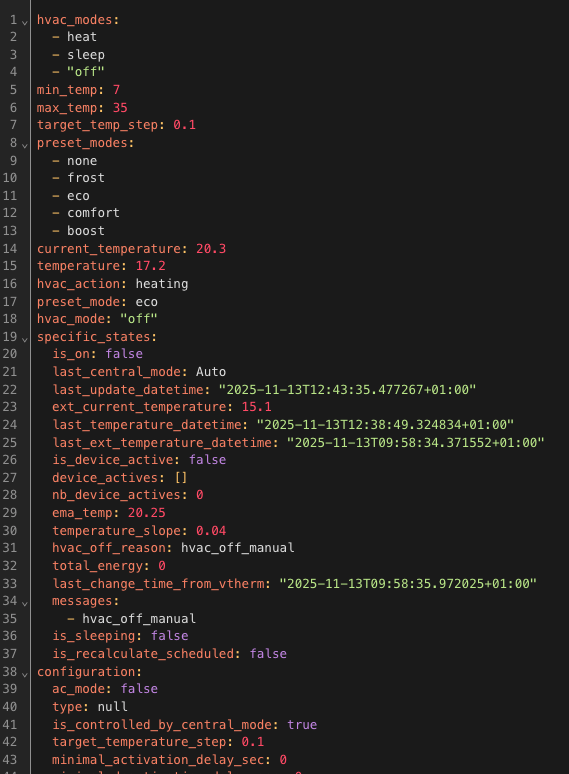
To tune the algorithm, you have access to the entire context seen and calculated by the thermostat through dedicated attributes. You can see (and use) these attributes in the HA "Developer Tools / States" UI. Enter your thermostat and you will see something like this:
For a VTherm
The custom attributes are as follows:
| Attribute | Meaning |
|---|---|
hvac_modes | The list of modes supported by the thermostat |
temp_min | The minimum temperature |
temp_max | The maximum temperature |
target_temp_step. | The target temperature step |
preset_modes | The visible presets for this thermostat. Hidden presets are not displayed here |
current_temperature | The current temperature as reported by the sensor |
temperature | The target temperature |
hvac_action | The action currently being performed by the heater. Can be idle, heating, cooling |
preset_mode | The currently selected preset. Can be one of 'preset_modes' or a hidden preset like power |
hvac_mode | The currently selected mode. Can be heat, cool, fan_only, off |
friendly_name | The thermostat name |
supported_features | A combination of all features supported by this thermostat. See the official climate integration documentation for more information |
is_presence_configured | Indicates if the presence detection function is configured |
is_power_configured | Indicates if the power shedding function is configured |
is_motion_configured | Indicates if the motion detection function is configured |
is_window_configured | Indicates if the window opening detection function by sensor is configured |
is_window_auto_configured | Indicates if the window opening detection function by temperature drop is configured |
is_safety_configured | Indicates if the temperature sensor loss detection function is configured |
is_auto_start_stop_configured | Indicates if the auto-start/stop function is configured (over_climate only) |
is_over_switch | Indicates if the VTherm is of type over_switch |
is_over_valve | Indicates if the VTherm is of type over_valve |
is_over_climate | Indicates if the VTherm is of type over_climate |
is_over_climate_valve | Indicates if the VTherm is of type over_climate_valve (over_climate with direct valve control) |
SECTION specific_states | ------ |
is_on | true if the VTherm is on (hvac_mode different from Off) |
last_central_mode | The last central mode used (None if the VTherm is not centrally controlled) |
last_update_datetime | The date and time in ISO8866 format of this state |
ext_current_temperature | The current outdoor temperature |
last_temperature_datetime | The date and time in ISO8866 format of the last indoor temperature reception |
last_ext_temperature_datetime | The date and time in ISO8866 format of the last outdoor temperature reception |
should_device_be_active | true if the underlying is active |
device_actives | The list of underlying devices currently seen as active |
nb_device_actives | The number of underlying devices currently seen as active |
ema_temp | The current average temperature. Calculated as the exponential moving average of previous values. Used to calculate temperature_slope |
temperature_slope | The current temperature slope in °/hour |
hvac_off_reason | Indicates the reason for the VTherm shutdown (hvac_off). Can be Window, Auto-start/stop or Manual |
total_energy | An estimate of the total energy consumed by this VTherm |
last_change_time_from_vtherm | The date/time of the last change made by VTherm |
messages | A list of messages explaining the current state calculation. See state messages |
is_sleeping | Indicates the VTherm is in sleep mode (valid for VTherm of type over_climate with direct valve control) |
is_recalculate_scheduled | Indicates that the recalculation of the underlying state has been delayed by time filtering to limit the number of interactions with the controlled equipment |
SECTION configuration | ------ |
ac_mode | true if the equipment supports Cooling mode in addition to Heating mode |
type | The VTherm type (over_switch, over_valve, over_climate, over_climate_valve) |
is_controlled_by_central_mode | True if the VTherm can be centrally controlled |
target_temperature_step | The target temperature step (same as target_temp_step) |
minimal_activation_delay_sec | The minimum activation delay in seconds (used with TPI only) |
minimal_deactivation_delay_sec | The minimum deactivation delay in seconds (used with TPI only) |
timezone | The timezone used for dates/times |
temperature_unit | The temperature unit used |
is_used_by_central_boiler | Indicates if the VTherm can control the central boiler |
max_on_percent | The maximum power percentage value (used with TPI only) |
have_valve_regulation | Indicates if the VTherm uses regulation by direct valve control (over_climate with valve control) |
cycle_min | The cycle duration in minutes |
SECTION preset_temperatures | ------ |
[eco/confort/boost]_temp | The configured temperature for preset xxx |
[eco/confort/boost]_away_temp | The configured temperature for preset xxx when presence is disabled or not_home |
SECTION current_state | ------ |
hvac_mode | The calculated current mode |
target_temperature | The calculated current temperature |
preset | The calculated current preset |
SECTION requested_state | ------ |
hvac_mode | The mode requested by the user |
target_temperature | The temperature requested by the user |
preset | The preset requested by the user |
SECTION presence_manager | ------ only if is_presence_configured is true |
presence_sensor_entity_id | The entity used for presence detection |
presence_state | on if presence is detected. off if absence is detected |
SECTION motion_manager | ------ only if is_motion_configured is true |
motion_sensor_entity_id | The entity used for motion detection |
motion_state | on if motion is detected. off if no motion is detected |
motion_delay_sec | The delay in seconds for motion detection when the sensor changes from off to on |
motion_off_delay_sec | The delay in seconds for no motion detection when the sensor changes from on to off |
motion_preset | The preset to use if motion is detected |
no_motion_preset | The preset to use if no motion is detected |
SECTION power_manager | ------ only if is_power_configured is true |
power_sensor_entity_id | The entity providing the home power consumption |
max_power_sensor_entity_id | The entity providing the maximum authorized power before shedding |
overpowering_state | on if over-power detection is detected. off otherwise |
device_power | The power consumed by the underlying when active |
power_temp | The temperature to use when shedding is activated |
current_power | The current home power consumption as reported by sensor power_sensor_entity_id |
current_max_power | The maximum authorized power as reported by sensor max_power_sensor_entity_id |
mean_cycle_power | An estimate of the average power consumed by the equipment over a cycle |
SECTION window_manager | ------ only if is_window_configured or is_window_auto_configured is true |
window_state | on if window open detection by sensor is active. off otherwise |
window_auto_state | on if window open detection by automatic detection algorithm is active. off otherwise |
window_action | The action taken when window open detection is effective. Can be window_frost_temp, window_eco_temp, window_turn_off, window_fan_only |
is_window_bypass | true if window detection bypass is enabled |
window_sensor_entity_id | The window open detection sensor (if is_window_configured) |
window_delay_sec | The delay before detection when the sensor state changes from off to on |
window_off_delay_sec | The delay before detection ends when the sensor state changes from on to off |
window_auto_open_threshold | The auto-detection threshold in °/hour |
window_auto_close_threshold | The detection end threshold in °/hour |
window_auto_max_duration | The maximum auto-detection duration in minutes |
SECTION safety_manager | ------ |
safety_state | The safety state. on or off |
safety_delay_min | The delay before activating safety mode when one of the 2 temperature sensors stops sending measurements |
safety_min_on_percent | Heating percentage below which the thermostat will not go into safety mode (for TPI only) |
safety_default_on_percent | Heating percentage used when the thermostat is in safety mode (for TPI only) |
SECTION auto_start_stop_manager | ------ only if is_auto_start_stop_configured |
is_auto_stop_detected | true if automatic stop is triggered |
auto_start_stop_enable | true if the auto-start/stop function is authorized |
auto_start_stop_level | The auto-start/stop level. Can be auto_start_stop_none, auto_start_stop_very_slow, auto_start_stop_slow, auto_start_stop_medium, auto_start_stop_fast |
auto_start_stop_dtmin | The dt parameter in minutes of the auto-start/stop algorithm |
auto_start_stop_accumulated_error | The accumulated_error value of the auto-start/stop algorithm |
auto_start_stop_accumulated_error_threshold | The accumulated_error threshold of the auto-start/stop algorithm |
auto_start_stop_last_switch_date | The date/time of the last switch made by the auto-start/stop algorithm |
SECTION timed_preset_manager | ------ |
timed_preset_active | true if a timed preset is active |
timed_preset_preset | The name of the active timed preset (or null if none) |
timed_preset_end_time | The end date/time of the timed preset |
remaining_time_min | The remaining time in minutes before the timed preset ends (integer) |
SECTION vtherm_over_switch | ------ only if is_over_switch |
is_inversed | true if the command is inverted (pilot wire with diode) |
keep_alive_sec | The keep-alive delay or 0 if not configured |
underlying_entities | the list of entities controlling the underlyings |
on_percent | The on percentage calculated by the TPI algorithm |
on_time_sec | The On period in sec. Must be on_percent * cycle_min |
off_time_sec | The off period in sec. Must be (1 - on_percent) * cycle_min |
function | The algorithm used for cycle calculation |
tpi_coef_int | The coef_int of the TPI algorithm |
tpi_coef_ext | The coef_ext of the TPI algorithm |
calculated_on_percent | The raw on_percent calculated by the TPI algorithm |
vswitch_on_commands | The list of custom commands for turning on the underlying |
vswitch_off_commands | The list of custom commands for turning off the underlying |
SECTION vtherm_over_climate | ------ only if is_over_climate or is_over_climate_valve |
start_hvac_action_date | Date/time of the last turn-on (hvac_action) |
underlying_entities | the list of entities controlling the underlyings |
is_regulated | true if auto-regulation is configured |
auto_fan_mode | The auto-fan mode. Can be auto_fan_none, auto_fan_low, auto_fan_medium, auto_fan_high, auto_fan_turbo |
current_auto_fan_mode | The current auto-fan mode. Can be auto_fan_none, auto_fan_low, auto_fan_medium, auto_fan_high, auto_fan_turbo |
auto_activated_fan_mode | The activated auto-fan mode. Can be auto_fan_none, auto_fan_low, auto_fan_medium, auto_fan_high, auto_fan_turbo |
auto_deactivated_fan_mode | The deactivated auto-fan mode. Can be auto_fan_none, auto_fan_low, auto_fan_medium, auto_fan_high, auto_fan_turbo |
follow_underlying_temp_change | true if VTherm should follow changes made directly on the underlying |
auto_regulation_use_device_temp | true if VTherm should use the underlying temperature for regulation calculation (should not be used in normal cases) |
SUB-SECTION regulation | ------ only if is_regulated |
regulated_target_temperature | The target temperature calculated by auto-regulation |
auto_regulation_mode | The auto-regulation mode. Can be auto_regulation_none, auto_regulation_valve, auto_regulation_slow, auto_regulation_light, auto_regulation_medium, auto_regulation_strong, auto_regulation_expert |
regulation_accumulated_error | The regulation_accumulated_error value of the auto-regulation algorithm |
SECTION vtherm_over_valve | ------ only if is_over_valve |
valve_open_percent | The valve opening percentage |
underlying_entities | the list of entities controlling the underlyings |
on_percent | The on percentage calculated by the TPI algorithm |
on_time_sec | The On period in sec. Must be on_percent * cycle_min |
off_time_sec | The off period in sec. Must be (1 - on_percent) * cycle_min |
function | The algorithm used for cycle calculation |
tpi_coef_int | The coef_int of the TPI algorithm |
tpi_coef_ext | The coef_ext of the TPI algorithm |
auto_regulation_dpercent | The valve will not be controlled if the opening delta is less than this value |
auto_regulation_period_min | The time filtering parameter value in minutes. Corresponds to the minimum interval between 2 valve commands (excluding user changes). |
last_calculation_timestamp | The date/time of the last valve opening command |
calculated_on_percent | The raw on_percent calculated by the TPI algorithm |
SECTION vtherm_over_climate_valve | ------ only if is_over_climate_valve |
have_valve_regulation | Indicates if VTherm uses regulation by direct valve control (over_climate with valve control). Is always true in this case |
SUB-SECTION valve_regulation | ------ only if have_valve_regulation |
underlyings_valve_regulation | the list of entities controlling valve opening (opening degrees), valve closing (closing_degrees) and calibration (offset_calibration) |
valve_open_percent | The valve opening percentage after applying the minimum allowed (see min_opening_degrees) |
on_percent | The on percentage calculated by the TPI algorithm |
power_percent | The applied power percentage |
function | The algorithm used for cycle calculation |
tpi_coef_int | The coef_int of the TPI algorithm |
tpi_coef_ext | The coef_ext of the TPI algorithm |
min_opening_degrees | The list of minimum authorized openings (one value per underlying) |
auto_regulation_dpercent | The valve will not be controlled if the opening delta is less than this value |
auto_regulation_period_min | The time filtering parameter value in minutes. Corresponds to the minimum interval between 2 valve commands (excluding user changes). |
last_calculation_timestamp | The date/time of the last valve opening command |
For central configuration
The custom attributes of the central configuration are accessible in Developer Tools / States on the binary_sensor.central_configuration_central_boiler entity:
| Attribute | Meaning |
|---|---|
central_boiler_state | The state of the central boiler. Can be on or off |
is_central_boiler_configured | Indicates whether the central boiler feature is configured |
is_central_boiler_ready | Indicates whether the central boiler is ready |
SECTION central_boiler_manager | ------ |
is_on | true if the central boiler is on |
activation_scheduled | true if a boiler activation is scheduled (see central_boiler_activation_delay_sec) |
delayed_activation_sec | The boiler activation delay in seconds |
nb_active_device_for_boiler | The number of active devices controlling the boiler |
nb_active_device_for_boiler_threshold | The threshold of active devices before activating the boiler |
total_power_active_for_boiler | The total active power of devices controlling the boiler |
total_power_active_for_boiler_threshold | The total power threshold before activating the boiler |
SUB-SECTION service_activate | ------ |
service_domain | The domain of the activation service (e.g., switch) |
service_name | The name of the activation service (e.g., turn_on) |
entity_domain | The domain of the entity controlling the boiler (e.g., switch) |
entity_name | The name of the entity controlling the boiler |
entity_id | The complete identifier of the entity controlling the boiler |
data | Additional data passed to the activation service |
SUB-SECTION service_deactivate | ------ |
service_domain | The domain of the deactivation service (e.g., switch) |
service_name | The name of the deactivation service (e.g., turn_off) |
entity_domain | The domain of the entity controlling the boiler (e.g., switch) |
entity_name | The name of the entity controlling the boiler |
entity_id | The complete identifier of the entity controlling the boiler |
data | Additional data passed to the deactivation service |
Example values:
central_boiler_state: "off"
is_central_boiler_configured: true
is_central_boiler_ready: true
central_boiler_manager:
  is_on: false
  activation_scheduled: false
  delayed_activation_sec: 10
  nb_active_device_for_boiler: 1
  nb_active_device_for_boiler_threshold: 3
  total_power_active_for_boiler: 50
  total_power_active_for_boiler_threshold: 500
  service_activate:
    service_domain: switch
    service_name: turn_on
    entity_domain: switch
    entity_name: controle_chaudiere
    entity_id: switch.controle_chaudiere
    data: {}
  service_deactivate:
    service_domain: switch
    service_name: turn_off
    entity_domain: switch
    entity_name: controle_chaudiere
    entity_id: switch.controle_chaudiere
    data: {}
device_class: running
icon: mdi:water-boiler-off
friendly_name: Central boiler
These attributes will be requested when seeking help.
State messages
The specific_states.messages custom attribute contains a list of message codes that explain the current state. Messages can be:
| Code | Meaning |
|---|---|
overpowering_detected | An overpowering situation is detected |
safety_detected | A temperature measurement fault is detected that triggered VTherm safety mode |
target_temp_window_eco | Window detection forced the target temperature to the Eco preset |
target_temp_window_frost | Window detection forced the target temperature to the Frost preset |
target_temp_power | Power shedding forced the target temperature with the value configured for shedding |
target_temp_central_mode | The target temperature was forced by central mode |
target_temp_activity_detected | The target temperature was forced by motion detection |
target_temp_activity_not_detected | The target temperature was forced by no motion detection |
target_temp_absence_detected | The target temperature was forced by absence detection |
Note: these messages are available in the VTherm UI Card under the information icon.