thermostat_over_valve Type Thermostat
Notes
- The
over_valvetype is often confused with theover_climatetype equipped with auto-regulation and direct valve control.- You should only choose this type when you do not have an associated
climateentity for your TRV in Home Assistant, and if you only have anumbertype entity to control the valve's opening percentage. Theover_climatewith auto-regulation on the valve is much more powerful than theover_valvetype.
Prerequisites
The installation should be similar to the over_switch VTherm setup, except that the controlled equipment is directly the valve of a TRV:
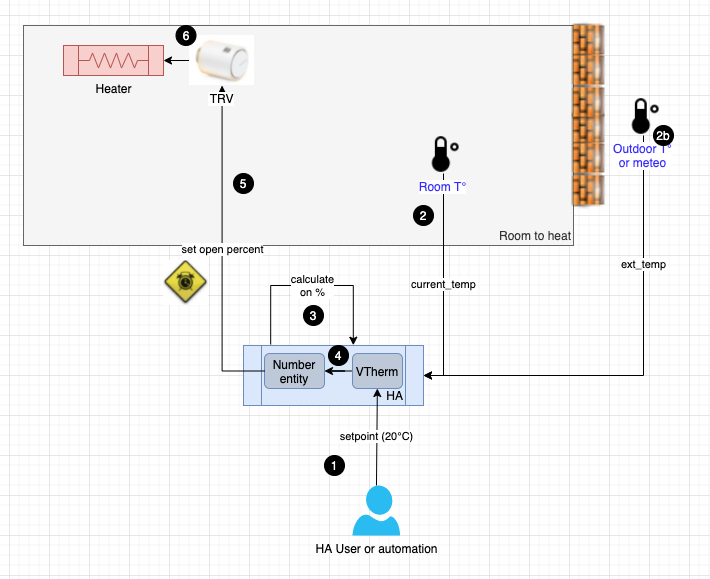
- The user or automation, or the Scheduler, sets a setpoint via a preset or directly using a temperature.
- Periodically, the internal thermometer (2) or external thermometer (2b) or internal thermometer of the equipment (2c) sends the measured temperature. The internal thermometer should be placed in a relevant spot for the user's comfort: ideally in the middle of the living space. Avoid placing it too close to a window or too near the equipment.
- Based on the setpoint values, the different temperatures, and the TPI algorithm parameters (see TPI), VTherm will calculate the valve's opening percentage.
- It will then modify the value of the underlying
numberentities. - These underlying
numberentities will control the valve opening rate on the TRV. - This will regulate the radiator's heating.
The opening rate is recalculated each cycle, which allows regulating the room temperature.
Configuration
First, configure the main settings common to all VTherms (see main settings).
Then, click on the "Underlying Entities" option from the menu, and you will see this configuration page, you should add the number entities that will be controlled by VTherm. Only number or input_number entities are accepted.
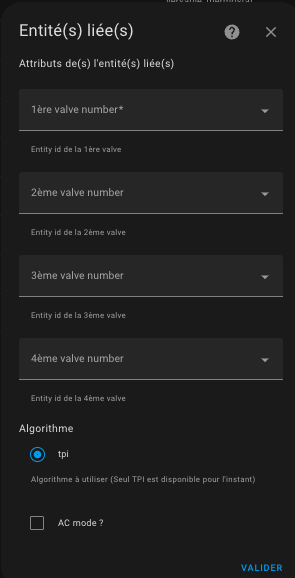
The algorithm currently available is TPI. See algorithm.
Valve opening control
over_valve can adjust the TPI opening command to match the physical limits of
each valve. The configuration uses the same parameters as direct valve control
with over_climate:
opening_threshold_degree: below this raw TPI percentage, the valve is considered closed.max_closing_degree: maximum closing percentage. The command under the threshold is100 - max_closing_degree; keep the default100to close it fully.min_opening_degrees: comma-separated minimum opening values, one per underlying valve. A value is applied as soon as the threshold is reached.max_opening_degrees: comma-separated maximum opening values, one per underlying valve. Omitted values use the maximum supported by the relatednumberentity.
For several valves, values are applied in the same order as the underlying
entities. Short lists use defaults for remaining valves; lists longer than the
underlying list are rejected. With the defaults (0, empty lists, 100), the
command sent to the valve remains identical to the raw TPI percentage.
It is possible to choose a thermostat_over_valve to control an air conditioner by checking the "AC Mode" box. In this case, only the cooling mode will be visible.
Sleep mode
over_valve supports sleep mode. Selecting sleep, or calling the
versatile_thermostat.set_hvac_mode_sleep action, presents VTherm as off while
sending a raw 100% opening request to every underlying valve. This request still
uses the normal opening-control conversion: max_opening_degrees and the
underlying number limits can therefore cap the physical opening. Sleep mode
does not request central boiler heating; is_sleeping identifies this state.